Project halted
viaNotion development and new signups are currently paused. The landing page remains available for reference.
Schedule social content from Notion
Stop juggling multiple platforms. Plan and publish Twitter and LinkedIn content directly from Notion — your audience never sleeps, and neither should your content strategy.
- Notion-native workflow
- Twitter & LinkedIn
- Built for creators
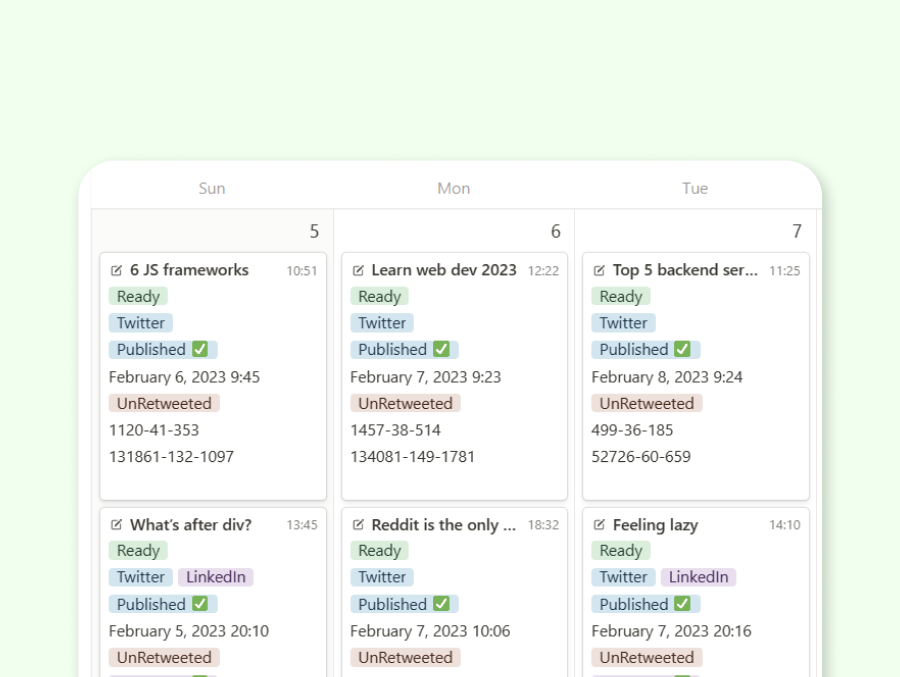
Your social hub, inside Notion
One workspace for planning, scheduling, and measuring your social presence.
24/7
Auto publishing
Schedule once and let viaNotion publish while you focus on creating.
2 platforms
Twitter & LinkedIn
Manage both channels from a single Notion-based workflow.
In Notion
Native workflow
Plan, write, and track content without leaving your workspace.
Secure
Bank-level security
Your data and social accounts protected with enterprise-grade security.
Everything to grow your social presence
Stop switching between apps. Manage your entire social media presence from your Notion workspace.
Unlimited social content
Create and schedule tweets, threads, and posts across Twitter and LinkedIn without restrictions.
Future-proof scheduling
Plan your content calendar months ahead with precise timing and automated publishing.
Real-time analytics
Track engagement, impressions, and performance directly within your Notion workspace.
Smart content recycling
Repurpose and reshare your best content with intelligent scheduling algorithms.
Advanced engagement tools
Automate retweets, manage engagement timing, and optimize your social strategy.
Cross-platform publishing
Convert Twitter threads into LinkedIn posts with intelligent content adaptation.
Four steps to automated publishing
Set up once, then write in Notion and let viaNotion handle the rest.
Connect Notion
Link your Notion workspace securely with viaNotion.
Add social accounts
Connect your Twitter and LinkedIn accounts in a few clicks.
Link your template
Connect social accounts with the included Notion template.
Start publishing
Add content in Notion and watch it publish automatically.
The smart way to scale your presence
Focus on content. Let automation handle the rest.
- Eliminate manual posting and focus on creating amazing content
- Real-time analytics help you understand what works
- Visual interface — no coding or complex setup required
- Bank-level security keeps your data protected
- Flexible automation that adapts to your workflow
- Comprehensive support for all major social platforms
Built for every kind of creator
Content creators
Scale your social media presence efficiently.
Businesses
Streamline your marketing operations from one hub.
Developers
Build powerful Notion integrations into your stack.
Agencies
Manage multiple client accounts without the chaos.
Loved by the community
See what creators say about their viaNotion experience.
“viaNotion offers a great way to manage your social activity. If you're a Notion user, you can keep everything under one roof. Great idea and great implementation.”
“viaNotion is an intuitive and user-friendly tool for efficiently scheduling posts on both Twitter and LinkedIn. Its affordability compared to other market tools makes it an excellent choice.”
“viaNotion is a minimalistic tool that consolidates all social media posts into one platform. What I love most is that it's incredibly simple to set up and easy to use.”
Explore viaNotion
Development is paused, but you can still visit the app and learn how viaNotion works.